
How to add your logo to food photos, and where to leave it off
RestoPhoto Team · October 23, 2026 · 6 min read

Put your logo on photos for Instagram, Facebook, ads and posters. Keep it small and in a corner, away from the dish. Make it slightly see-through. Save it as a PNG with a transparent background. Leave it off item photos in delivery apps: Uber Eats does not accept item photos with logos, watermarks or any text.
Where a logo helps, and where it hurts
A logo tells people whose food they are looking at. That matters once a photo leaves your profile. Guests share screenshots. Local pages repost dishes. Ads reach people who do not follow you yet.
- Add the logo to Instagram and Facebook posts, Stories, paid ads, posters, flyers and table cards.
- Leave it off item photos in delivery apps. Guests order from your store page there, so they already see your name.
Pick a corner away from the dish
The dish stays the main subject of the photo. Put the logo in the corner with the most empty space, often a free patch of table or backdrop. Keep it off the food, the rim of the plate, steam and sauce.
Use the same corner on every post. Your feed then looks consistent.
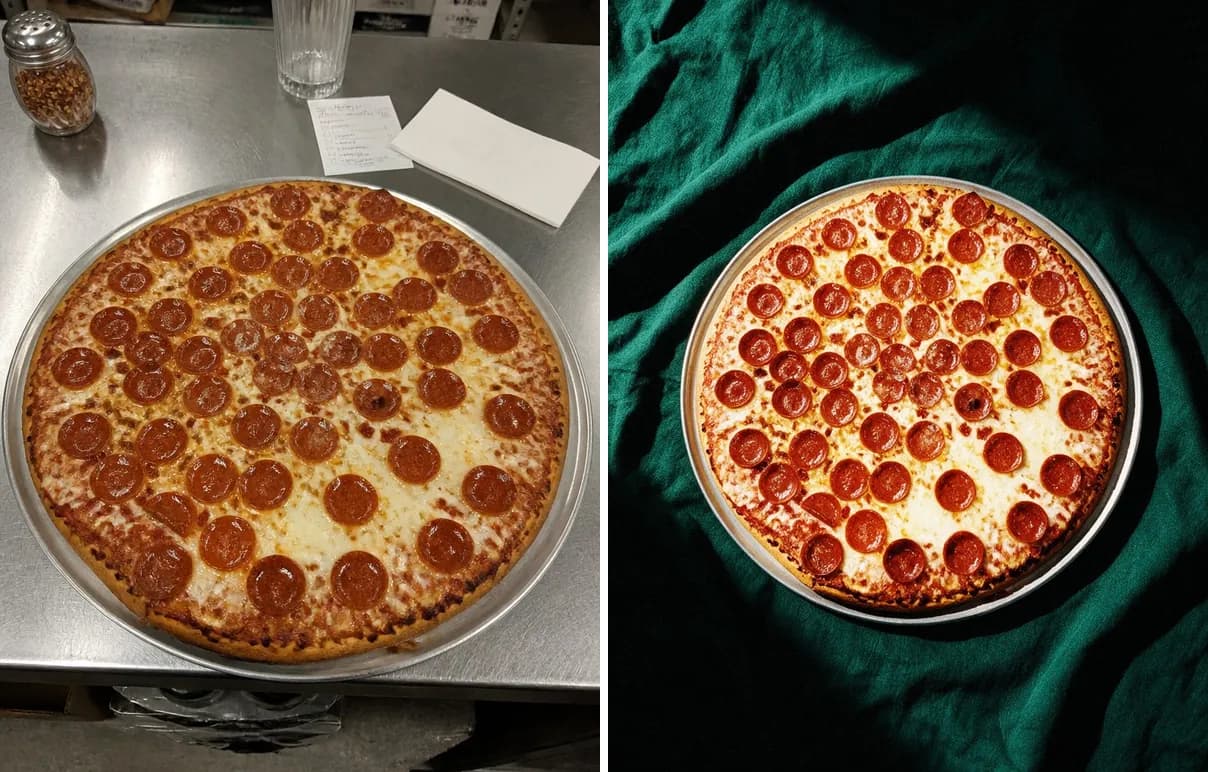
A plain cloth around the plate leaves all four corners free for a small logo.
In Stories, keep clear of the edges
Meta's ad guide for Instagram Stories gives safe margins. Keep about 14% of the top, 35% of the bottom and 6% of each side free of text and logos. The profile icon and the call to action then cover nothing important. Use the same margins for your own Stories.
Take a Story 1080 pixels wide and 1920 pixels tall. The free margins are then about 270 pixels at the top, 670 at the bottom and 65 on each side.
Meta Ads Guide: image ads in Instagram Stories
Size, transparency and the logo file
- Start with a logo about one tenth of the photo width. If your eye finds the logo before the dish, make it smaller.
- Lower the opacity until the logo stops pulling the eye. It must still be easy to read.
- Save the logo as a PNG with a transparent background. A logo on a white box hides part of the photo.
- Keep two versions: a light one for dark photos and a dark one for light photos.
- Resize the logo from a corner only, so its shape stays the same.
Delivery apps: brand the packaging, not the photo
Uber Eats lists what item photos cannot contain. Logos and watermarks are on that list, and so is any text.
There is one exception. Logos and text are fine on the food item itself, on the packaging or on the plate. A printed box, a branded cup or a plate with your name can stay in the shot.
The store cover photo has its own rule. Uber Eats allows a brand name there, as long as it does not overpower the image.
Uber Eats Help: menu catalog photo guidelines
DoorDash and Grubhub publish their own photo rules for merchants. Read them before a large upload.
For the delivery versions of a dish, start from the photo without a logo. The free Delivery App Photo Resizer crops it for DoorDash, Uber Eats and Grubhub in your browser.
Free tool: Delivery App Photo Resizer
Delivery app food photos: sizes for DoorDash, Uber Eats and Grubhub
Add a logo on iPhone without another app
The Photos app can put your logo on a photo as a sticker. First, turn the logo into a sticker. Then add it to the dish photo with Markup.
- Save your logo as an image in Photos. A logo on a plain background works best.
- Open the logo image. Touch and hold the logo, then release.
- Tap Add Sticker.
- Open the dish photo and open the Markup tools.
- In the Markup toolbar, tap the plus button, then Add Sticker. Drag your logo onto the photo.
- Drag a blue dot on the sticker's frame to resize the logo. Then save your edits.
Need only the name of your restaurant? In the Markup toolbar, tap the plus button, then Add Text, and type the name.
Apple iPhone User Guide: make stickers from your photos
Apple iPhone User Guide: add text and stickers with Markup
Add your name on Android with Google Photos
Google Photos adds text to a photo with its Markup tool. A logo file needs an editor with layers, or RestoPhoto.
- Open the photo in Google Photos.
- Tap Edit, then Markup. On some phones the path is Edit, Tools, Markup.
- Tap Text and type the name of your restaurant.
- Touch and hold the text box, then drag it into a corner.
- Tap the checkmark.
- Tap Save as copy. The original photo stays as it was.
Google Photos Help: edit your photos on Android
Add the logo automatically in RestoPhoto
Upload your logo once, in the Brand profile. A PNG with transparency works best, but JPG and WEBP work too.
Under Logo on photos, turn on Add logo to new photos. Set the Logo position and the Transparency in the same place.
In the Studio, the Place your logo switch works for each photo on its own. With Automatic, RestoPhoto picks the corner, the size and the color of the logo, and keeps it off the dish and the text. With I'll choose the spot, you pick the corner yourself.
Making a photo for a delivery app? Turn the logo off for that one photo.
One phone photo of a real dish becomes a photo for Instagram, Facebook or a delivery app. A finished photo takes 1 to 3 minutes, on the web, iOS or Android.
The dish stays yours. What changes is the light, the backdrop and the framing. AI can still change small details of a dish, and some styles add props around the plate, so compare the result with your original before you publish.
Try it on one of your own dishes. Your first photo is free, no card.
Try RestoPhoto on one of your own dishes
FAQ
How do I add a logo to a photo on iPhone?
Turn the logo into a sticker in Photos: open the logo, touch and hold it, release, then tap Add Sticker. Then open the dish photo, choose Add Sticker in Markup and drag the logo into a corner.
Can I put my logo on Uber Eats photos?
Not on item photos. Uber Eats does not accept item photos with logos, watermarks or added text. A logo printed on the packaging or the plate is allowed. The store cover may show your brand name if it does not overpower the image.
How big should a logo be on a food photo?
Start at about one tenth of the photo width, in a corner. If the logo catches the eye before the dish, make it smaller.
What file format is best for a logo on photos?
A PNG with a transparent background. Keep a light and a dark version, so the logo stays readable on any backdrop.
Where should a logo go in an Instagram Story?
Inside the margins from Meta's ad guide: about 14% from the top, 35% from the bottom and 6% from each side.
Try RestoPhoto with your own photo
Upload a dish photo and choose a style. Compare the result with the original before publishing.
Try RestoPhoto