
What the Best Restaurant Instagram Accounts Actually Do Differently
RestoPhoto Team · August 28, 2026 · 3 min read
Judge a restaurant Instagram account by the job it needs to do: help someone recognize the food, find current information and take the next step. A polished grid alone cannot tell you whether an account brings in bookings. Use these checks on your own profile before copying another restaurant’s style.
Make the next visit easy to plan
Open your profile as a guest would. Can you find the location, current hours and the route to a reservation or order? Follow the link all the way to the destination. A working homepage link can still leave someone searching through several pages for the booking button.
Check temporary offers as carefully as the permanent information. A lunch special needs its days, serving times and any booking conditions. Remove an expired offer from places where a visitor could mistake it for a current one.
Give each post a specific purpose
- Introduce a dish: show the portion and explain what comes with it.
- Explain a change: give the date and the details a guest needs.
- Show the kitchen at work: choose one action that helps explain the food.
- Invite a booking: state the occasion, availability and route to reserve.
A recurring dish can appear again when there is something useful to add: a different preparation step, an updated accompaniment or a new serving occasion. Repetition is a planning option, not a promise of reach.
Choose the format before editing
Use a still image when one frame explains the dish. Choose a sequence when the order matters, or video when motion adds information, such as pouring a sauce or cutting a filled pastry. You do not need a fixed quota of each format.
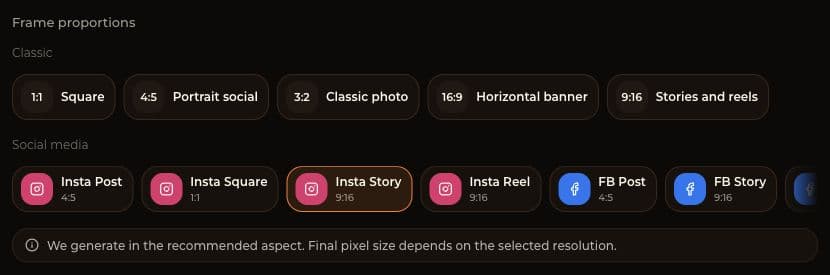
RestoPhoto’s format selector includes separate options for a square image, a portrait post and a Story. The screenshot shows Insta Story at 9:16. Check the exported image inside Instagram before publishing: the crop, text and interface controls can affect what remains visible.
Keep the food recognizable
Compare edited images with the original serving. Check ingredients, portion size, utensils and garnish. If you show staff or guests, agree on the use of their image before recording. A staged scene should still represent something a visitor can expect from the restaurant.
Keep a small set of visual choices that your team can repeat, such as one surface and a consistent way to frame the plate. Save originals and approved exports separately so an old draft does not become the next published post.
Test reach instead of guessing the algorithm
Meta describes recommendations across several Instagram surfaces, including Feed and Explore. Video is not the only route to people who do not follow an account. Results depend on the content, the viewer and other signals; a format alone cannot guarantee discovery.
Meta: how Instagram content is ranked and recommended
Choose a posting schedule your team can maintain, then compare similar posts over several weeks. Record the topic, format, publication time and the outcome you care about. Use the account’s available insights, and separate reach from inquiries or confirmed bookings. A busy weekend, a promotion or a paid boost can change the comparison.
Turn the review into one next action
Fix the booking link if it fails. Replace an expired offer if it is still prominent. If the basics work, test one content change and keep a note of the result. Changing the topic, timing and format together makes it harder to learn which choice helped.
Try RestoPhoto with your own photo
Upload a dish photo and choose a style. Compare the result with the original before publishing.
Try RestoPhoto